Miro pricing reads as three numbers and one sales call: $0, $8, $20, and a quote. The number that decides your bill is rarely the one on the card.
Most teams assume the Free plan’s board cap is what pushes them to pay. In practice, board privacy, signed-in guest editing, and AI capacity move teams up a tier far more often, and each of those sits behind a different gate.
This guide prices Miro the way a finance lead would read it. Real annual spend at 5, 10, 20, 25, and 50 seats, the exact feature gates behind each tier, the costs Miro does not publish anywhere, and the plan each team shape should land on.
Prices below were checked against Miro’s official pages on 28 August 2026. If you are still shortlisting, it also helps to know where Miro sits against other team collaboration tools before you commit to a per-seat contract.
Quick Pricing Verdict
| Question | Answer |
|---|---|
| Starting price | $0 on Free, then $8 per member/month billed yearly |
| Free plan | Yes, unlimited boards but only the 3 most recent stay editable |
| Best plan for most teams | Starter at $8 per member/month, billed yearly |
| Plan to avoid | Month-to-month Business at $25 per member/month if the team is stable |
| Biggest hidden cost | AI credits and Enterprise add-ons, none of which carry a public price |
| Cheaper alternative worth checking | A Figma Collab seat at $3 per member/month, if the team already pays for Figma |
| Enterprise entry point | Custom quote, listed from 30 members |
| Pricing verified | 28 August 2026, against Miro’s official pricing page |
Sources: Miro’s published plan rates, Miro’s monthly cadence, and Figma’s seat pricing, checked 28 August 2026.
How Much Does Miro Cost?
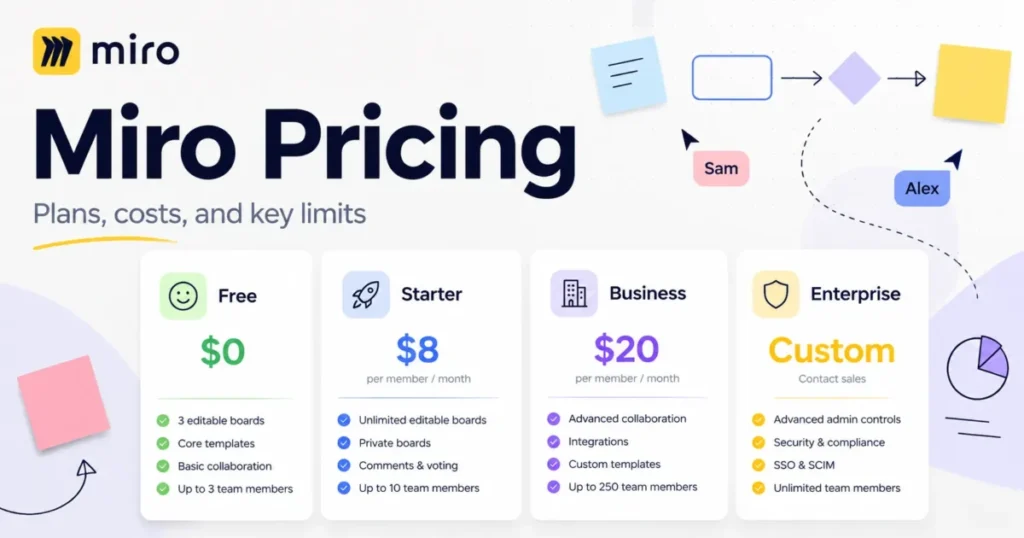
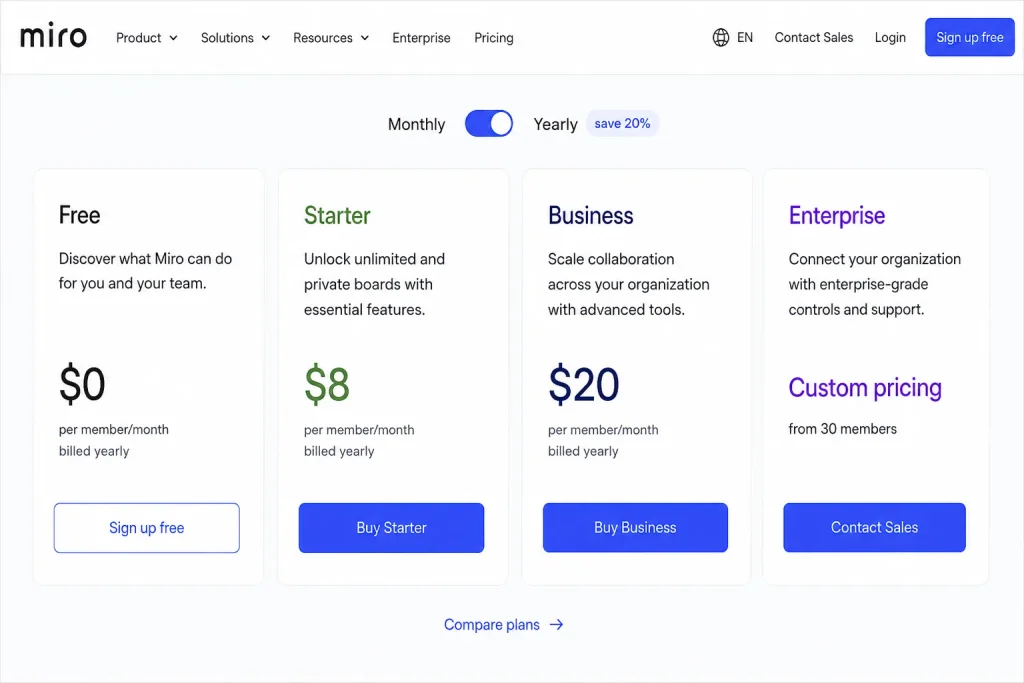
Miro costs $0, $8, or $20 per member per month on public plans, with Enterprise quoted privately. The official pricing page lists Free at $0, Starter at $8 per member/month billed yearly, Business at $20 per member/month billed yearly, and Enterprise as custom pricing “from 30 members”.
Month-to-month rates are not shown by default because the pricing page opens on the yearly toggle. Miro’s diagramming product page publishes both cadences: Starter is $10 per member/month and Business is $25 per member/month when billed monthly.
| Plan | Billed yearly | Billed monthly | Billing basis | Best for | Key limit that bites |
|---|---|---|---|---|---|
| Free | $0 | $0 | Per workspace | Trying the canvas, one-off workshops | Only the 3 most recent boards stay editable |
| Starter | $8 per member/mo | $10 per member/mo | Per member | Small recurring teams needing private boards | Signed-in guests cannot edit |
| Business | $20 per member/mo | $25 per member/mo | Per member | Client work, SSO, full AI Workflows | Engage activities capped at 50 participants |
| Enterprise | Custom | Custom | Negotiated contract | Centralised IT governance | Listed from 30 members, quote required |
Sources: Miro’s plan pricing and Miro’s published monthly rates, checked 28 August 2026.
Annual billing is the single largest discount Miro publishes. The pricing page’s billing toggle is labelled “Yearly (save 20%)”, which works out to $24 saved per Starter seat per year and $60 per Business seat per year against twelve months at the monthly rate.
Two 2026 changes that break older pricing pages
Several high-ranking pricing summaries still quote Business at $16 per member/month. That figure is stale against Miro’s own page, and budgeting from it understates a 10-seat annual bill by $480.
Miro also changed what Business includes partway through the year. Prototypes and Engage stopped being separate purchases on 29 June 2026.
The change note states that “Miro Prototypes moves from a paid add-on into the Business plan” and that “Miro Engage ends its free beta and is included in the Business plan”.
Any guide written before that date will either price Prototypes as an add-on you still have to buy, or omit Engage entirely. Both errors push your modelled Business cost in the wrong direction, so check the publication date on whatever else you are reading.
Miro Plans Compared
The four plans are not four sizes of the same product. Each one removes a specific operational constraint, and the constraint is what should drive the choice.
Free: unlimited boards, three of them editable
Free is genuinely free with unlimited members, and the board rule is more subtle than the usual “three boards” shorthand. Miro’s pricing page states that you “create and share unlimited boards” but that only the “three most recent ones will remain editable”.
Older boards do not disappear. They freeze, which means a quarterly planning canvas from two quarters ago is readable but no longer workable without upgrading.
The gate that catches teams earlier is privacy. Free has no private boards at all, so anything on the canvas is visible to every member of the workspace by default.
Exports are also capped: high-resolution frame download as JPG or PDF starts at Starter. And Free sits at 100 MCP calls per day, which is enough to try an AI client against a board and not enough to run one.
Avoid Free if: you handle client, HR, compensation, or unreleased-roadmap content on a shared workspace, or you need more than three canvases live at once.
Starter: the tier most teams actually need
Starter at $8 per member/month billed yearly is where Miro becomes a working tool rather than a demo. Miro’s Starter documentation lists private boards, unlimited editable boards, “high-quality resolution export without a watermark”, and “board backup and import”.
It also opens external collaboration, but only in one direction. Starter allows “visitors via a publicly shareable link with no login required” to edit a board, while signed-in guests are held to view and comment.
That distinction is the single most misread line in Miro’s plan structure, and it gets its own matrix further down because it decides whether a five-person agency needs Business.
AI is where Starter is thinnest. It carries 25 AI credits per member per month and a documented “5 Flow runs per team member, and limited Sidekicks functionality”, against 500 MCP calls per day.
Avoid Starter if: clients must edit while signed in, your identity team requires SSO, or your workflow depends on Miro’s AI agents rather than occasional AI assists.
Business: a security and workflow upgrade, not a size upgrade
Business at $20 per member/month billed yearly is 2.5 times the Starter rate, and almost none of that premium buys more canvas. It buys authenticated external editing, identity integration, and the full AI stack.
Miro’s Business documentation lists “unlimited guests” who can be invited “as securely signed-in guests for collaboration”, “unlimited workspaces”, and single sign-on through “Entra ID, OneLogin, and Auth0”. The pricing page adds two-way integrations with tools including Jira, Asana, Linear, ClickUp, and Azure.
Since 29 June 2026 the plan also carries Miro Prototypes, which generates “prototypes from prompts, screenshots, HTML, code, or any board content”, and Miro Engage for polls, 2×2 matrices, and scales. If prototyping is the reason you are looking at Business, it is worth checking the tier against dedicated AI prototyping tools before paying a per-seat premium for it.
Engage carries a ceiling the plan cards do not emphasise. Miro’s comparison lists Engage activities for “up to 50 participants” on both Business and Enterprise, and commercial terms for larger sessions are not published.
Avoid Business if: your external collaborators are happy working through a public link, and nobody in the organisation is asking for SSO or SCIM.
Enterprise: bought for governance, not for boards
Enterprise is custom-priced and listed on the pricing page as starting “from 30 members”. Nothing about board volume justifies it, because Starter already gives unlimited editable boards.
What Enterprise adds is organisational control: SSO with SCIM provisioning, domain control, and audit logs.
It also adds a Flexible Licensing Program that lets you add users without committing in advance, and data residency options in the EU, US, Australia, and Japan.
One caution for buyers in the 30 to 49 seat range. Miro’s Help Center plan-comparison table marks Enterprise with a footnote about team size that the published table does not spell out.
Confirm eligibility with sales rather than planning a 32-seat Enterprise rollout on the pricing page’s wording alone.
Support is also structured differently than most buyers expect. Email support runs from Starter upward, the customer success program is Enterprise-only, and premium support is listed as “not included” on every self-serve plan and a “paid add-on” on Enterprise.
Feature gates by plan
| Capability | Free | Starter | Business | Enterprise |
|---|---|---|---|---|
| Editable boards | 3 most recent | Unlimited | Unlimited | Unlimited |
| Private boards | No | Yes | Yes | Yes |
| High-resolution export | No | Yes | Yes | Yes |
| Public-link visitor editing | No | Yes | Yes | Yes |
| Signed-in guest editing | No | View or comment only | Yes | Yes |
| AI credits per member/month | Limited trial | 25 | 50 | Pooled, from 2,500/org |
| AI Workflows | Not offered | 5 Flow runs per member, limited Sidekicks | Full Flows and Sidekicks | Available as an add-on |
| MCP calls per day | 100 | 500 | 2,000 | 10,000 |
| Single sign-on | No | No | SAML SSO | SSO with SCIM |
| Audit logs and domain control | No | No | No | Yes |
| Support | Help Center only | Email, customer success, premium as paid add-on |
Sources: Miro’s plan comparison, Starter plan documentation, Business plan documentation, and Enterprise plan documentation, checked 28 August 2026.
Read that table by row, not by column. The jump from Free to Starter buys privacy and permanence, the jump from Starter to Business buys authenticated external access and AI depth, and the jump to Enterprise buys identity lifecycle management.
A team that needs none of those three things has no reason to move up, however large it gets.
Miro Hidden Costs and Limits
Miro’s list price is honest as far as it goes. The gap between the rate card and the invoice comes from four places: unpriced add-ons, consumption ceilings, billing mechanics, and the things the product does not do.
The add-on layer Miro does not price publicly
Three add-ons exist and none of them carries a public dollar figure. Miro’s add-on documentation names a Miro AI credits add-on, Enterprise Guard for security and governance, and an Enterprise AI Workflows add-on covering Sidekicks and Flows.
The billing behaviour is documented even though the prices are not. Add-ons are “billed with your existing plan subscription”, prorated when bought mid-cycle, renewed automatically in one invoice, and carry the same 20 percent annual saving on yearly billing that the plans do.
That leaves a real hole in any Miro total-cost model. If your team is AI-heavy, or your security review will require Enterprise Guard, you cannot finish the budget from public information and will need a quote.
| Cost item | Who it hits | Public price | What to do |
|---|---|---|---|
| AI credits add-on | Starter and Business teams that exhaust the pool | Not published | Track credit burn for one cycle, then request pricing |
| Enterprise Guard | Enterprise buyers with governance requirements | Not published | Put it in the RFP, not the renewal |
| AI Workflows add-on | Enterprise buyers wanting Sidekicks and Flows | Not published | Confirm whether it is bundled in your quote |
| Premium support | Enterprise buyers needing an SLA | Not published | Price it before signing, not after an incident |
| Prorated seats added mid-term | Any growing team | Plan seat rate | Add seats in batches near renewal where possible |
Source: Miro’s add-on documentation, checked 28 August 2026.
None of these is mandatory. All of them are the kind of line item that appears after the plan decision has already been made, which is the worst moment to discover it.
AI credits and MCP calls: two ceilings, two behaviours
AI credits are pooled, not personal. Miro’s credit documentation states that “credits are pooled and shared across your team” and that “everyone draws from one balance”, so one heavy user can consume a five-person team’s monthly allocation.
The pool sizes are small at the entry tiers. A 10-seat Starter team pools 250 credits per month, and the same team on Business pools 500, with credits that “refresh monthly and don’t roll over”.
Reset timing differs by plan in a way that matters for planning. Starter and Business reset on the plan renewal date, while Free and Enterprise reset on the first day of the calendar month.
Enterprise credits work on bands rather than per seat, and the bands create a genuine pricing edge. The documented allocation starts at 2,500 credits per month for 1 to 50 seats and steps to 5,000 for 51 to 100.
An organisation at 51 seats therefore draws roughly twice the per-seat AI capacity of one at 50.
MCP is a separate quota with separate behaviour, and conflating the two is how technical buyers mis-size a plan.
| Limit | Free | Starter | Business | Enterprise |
|---|---|---|---|---|
| AI credits | Limited trial | 25 per member/month | 50 per member/month | Pooled, from 2,500/month |
| Credit pooling | Shared | Shared | Shared | Shared org-wide |
| Credit rollover | None | None | None | None |
| MCP calls | 100/day | 500/day | 2,000/day | 10,000/day |
| MCP overflow | Blocked until reset | Blocked until reset | Blocked until reset | Blocked until reset |
Sources: Miro AI credit documentation, Enterprise AI credit bands, and the Miro MCP Server overview, checked 28 August 2026.
The MCP allowance “resets at 00:00 UTC”, and once it is gone “further MCP tool calls are blocked until the limit resets, and your AI tool receives an error message”. For a team running an agent against Miro boards, that is a hard stop in the middle of a working day, not a slowdown.
The 4x step from Starter’s 500 calls to Business’s 2,000 costs $12 per seat per month. On a 10-seat team that is $1,440 a year for the automation headroom, bought alongside features you may not need.
MCP limits are not API rate limits
These are two different budgets and they fail differently. MCP has a plan-level daily call allowance that the plan comparison publishes, and it is the one that stops an AI client mid-session.
Miro’s developer API is governed separately, in its own developer rate-limiting reference rather than in the plan table. A team building an internal integration should size against both budgets, because clearing one says nothing about the other.
Visitors and guests: the external-collaboration gate
This is the distinction that most often decides between an $8 seat and a $20 seat, and Miro’s own wording is precise about why. The sharing documentation frames it as “the amount of security you have over a board and the level of access you can provide to individual users”.
| External collaborator | Login required | Free | Starter | Business and Enterprise |
|---|---|---|---|---|
| Visitor via public link | No | View only | View, comment, edit | View, comment, edit |
| Signed-in guest | Yes | Not available | View, comment only | View, comment, edit |
Source: Miro’s external-sharing documentation, checked 28 August 2026.
A Starter team can absolutely let a client edit a board. It just has to do it through a public link, which means anyone holding the URL has the same access.
If your client contract, security review, or legal team rules out unauthenticated edit links, Starter is off the table regardless of headcount. That is why a five-person consultancy can rationally sit on Business while a twenty-person internal design team stays on Starter.
Billing rules that quietly change the bill
Seat changes are not symmetrical. Miro’s pricing page states that “adding a member mid-cycle is prorated” while “removing a member takes effect at renewal, not immediately”.
The billing documentation confirms that removing unallocated licences lands on “your next renewal date”.
Over-buying seats in month two of an annual term therefore costs you ten months of nothing. Size the initial purchase to current headcount and add in batches, rather than buying the headcount you hope to have.
Payment route matters more than most teams expect. Automated card payments carry “no license minimum”, but “invoicing is annual-only, requires a minimum of 10 licenses on Starter or 5 on Business”.
That inverts the usual logic. A six-person team whose finance policy requires invoicing cannot buy Starter that way, but can invoice Business, so the cheaper plan is the harder one to buy through procurement.
Renewal is automatic, and the trial converts. Miro’s trial documentation gives the Business trial as 14 days and states that “unless you cancel during the 14-day period, your trial automatically converts to a paid Business subscription”.
The exit differs by where you started. A Starter team that cancels returns to Starter “with no changes or additional charges”, while a Free account that cancels “enters a view-only mode”, and a converting Starter team sees its unused Starter time prorated onto the first Business invoice.
One more item for existing customers: the legacy Business note states that Miro “will sunset the legacy Business plan in approximately 1 year”, and that legacy customers are held to “a maximum of 5 Flow runs per member” where “the runs count does not reset”.
If you are on legacy Business, that is a migration to plan for rather than a renewal to rubber-stamp.
Migration and platform limits
Importing existing diagrams is a paid-tier feature and a one-way trip. Lucidchart import runs on Starter, Business, Enterprise, and Education, and Miro’s documentation is explicit that “any changes you make in Miro will not be synchronized back to Lucidchart”.
Visio import covers Starter, Business, and Enterprise with the same constraint: “changes made in Miro are not synced back to Visio automatically”. Treat either as a cutover, not a sync, and budget the time to re-point whoever still owns the source file.
Teams weighing that switch should compare Miro against dedicated diagramming software before migrating a library they cannot easily migrate back.
Mobile is the other place the product is narrower than the plan implies. Miro runs on iOS 16 or later and Android 7 or later, but the mobile documentation lists templates, board export, presentation mode, video chat, voting, and starred boards as unsupported on mobile.
A facilitator who plans to run voting and presentation mode from a phone will be reaching for a laptop. You also cannot change a subscription or add licences from the mobile app.
Miro Cost by Team Size
Everything above turns into one number once you fix a seat count and a billing cadence. The table below is straightforward arithmetic on Miro’s published rates: seats multiplied by the per-member monthly price multiplied by twelve.
| Seats | Starter yearly | Starter at monthly rate | Business yearly | Business at monthly rate | Annual saving on Business |
|---|---|---|---|---|---|
| 5 | $480 | $600 | $1,200 | $1,500 | $300 |
| 10 | $960 | $1,200 | $2,400 | $3,000 | $600 |
| 20 | $1,920 | $2,400 | $4,800 | $6,000 | $1,200 |
| 25 | $2,400 | $3,000 | $6,000 | $7,500 | $1,500 |
| 50 | $4,800 | $6,000 | $12,000 | $15,000 | $3,000 |
Calculated from Miro’s published per-member rates, checked 28 August 2026, using seats x monthly rate x 12. Excludes tax, add-ons, and any negotiated Enterprise terms.
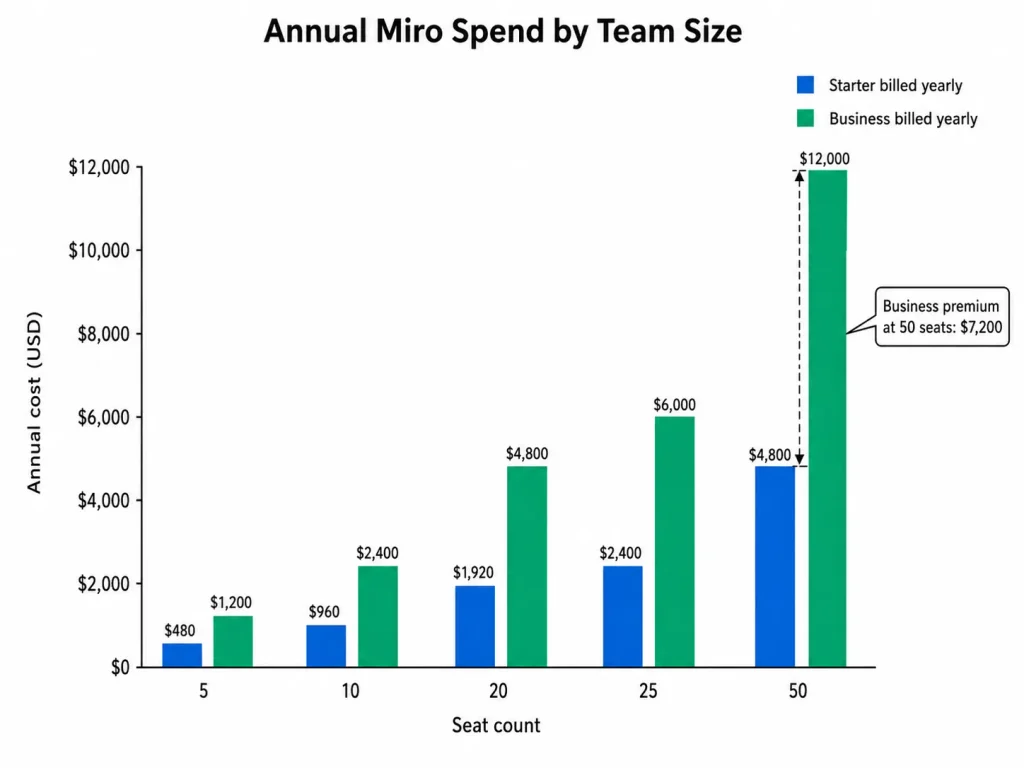
The Starter-to-Business gap is the number to sit with. At 25 seats it is $3,600 a year, and at 50 seats it is $7,200, which is real budget being spent on guest authentication, SSO, and AI depth rather than on canvas.
Solo users and pairs
One or two people running a handful of live canvases should stay on Free until privacy forces the issue. Three editable boards covers a solo consultant who archives as they go.
The trigger is not board count. It is the first canvas you do not want every workspace member reading, at which point Starter at $96 a year for one seat is the cheapest fix available.
The 5-person team
Five Starter seats cost $480 a year, against $1,200 for Business. For an internal team running workshops, retros, and process maps, Starter covers it and the $720 difference stays in the budget.
Flip to Business at this size only for a specific reason. A five-person agency whose clients must edit while signed in has that reason, and $1,200 a year is a small price against a failed security review.
10 to 20 users
This is where the AI and MCP ceilings start to bind before the seat cost does. Ten Starter seats pool 250 AI credits a month across the whole team, which one person doing heavy synthesis can spend in a week.
The upgrade decision at this size is worth running as arithmetic. Moving 15 seats from Starter to Business costs $2,160 a year and buys 750 pooled credits, full Flows and Sidekicks, 2,000 daily MCP calls, and SSO.
If two of those four are load-bearing for your workflow, Business is defensible. If none of them is, you are buying $2,160 of headroom you will not touch.
25 or more users
Above 25 seats the annual-versus-monthly decision alone is worth $600 on Starter and $1,500 on Business, so lock the cadence first. Then look at whether governance requirements have arrived.
At 30 seats you become eligible to ask for an Enterprise quote. Ask early even if you expect to stay on Business.
The Enterprise AI credit bands are more generous per seat just above each boundary, and SCIM and audit logs are usually cheaper to buy before a security review than after one.
Monthly versus annual billing
Miro’s discount is a flat 20% for committing to a year, applied through the pricing page’s “Yearly (save 20%)” toggle. Per seat, that is $24 a year on Starter and $60 a year on Business.
Monthly billing is worth its premium in exactly one situation: a genuinely uncertain team size or a project with a known end date inside twelve months. Seat reductions only take effect at renewal, so a team that pays annually and shrinks in month three carries those seats to the end of the term either way.
Which Miro Plan Should You Choose?
Team size is a poor predictor here. Work through these four questions in order and stop at the first yes.
- Does any board need to be private, or do you need more than three canvases live at once? If no, stay on Free. If yes, you need at least Starter.
- Must external collaborators edit while signed in, rather than through a public link? If yes, you need Business. Public-link editing on Starter is functionally fine and is a security decision, not a feature gap.
- Does your identity team require SSO, or does your workflow depend on Miro’s Flows and Sidekicks rather than occasional AI assists? If yes, Business. Starter’s 5 Flow runs per member will not carry a real AI workflow.
- Do you need SCIM provisioning, audit logs, domain control, or regional data residency? If yes, request an Enterprise quote, and expect the conversation to start at 30 members.
| Team shape | Plan | Annual cost at that size | Why this tier |
|---|---|---|---|
| Solo consultant, occasional canvases | Free | $0 | Three editable boards is enough until privacy matters |
| 3 to 20 internal product or design team | Starter | $288 to $1,920 | Private unlimited boards and public-link visitor editing |
| 5 to 50 consultancy with client editing | Business | $1,200 to $12,000 | Signed-in guest editing plus SSO |
| 10 to 50 team running AI agents on boards | Business | $2,400 to $12,000 | 2,000 daily MCP calls and full AI Workflows |
| 30+ seats under centralised IT | Enterprise | Custom quote | SCIM, audit logs, domain control, data residency |
Source: annual costs derived from Miro’s per-member rates at the seat counts each row names, checked 28 August 2026.
If the second row is you, it is worth checking how Miro compares against other design collaboration software before locking in an annual term at that seat count.
Which Miro plan should you avoid?
Month-to-month Business is the plan to avoid for any team with stable headcount. At $25 per member/month it costs $60 more per seat per year than the identical plan billed annually, and Miro’s seat-removal rule means the flexibility you paid for does not refund mid-term anyway.
The exception is a project team with a hard end date inside a year. There, paying $60 per seat for the ability to stop is a reasonable trade.
Legacy Business is the other plan to leave. It is scheduled to sunset within about a year and caps members at 5 Flow runs that never reset, so a team on it is paying Business money for a materially thinner AI allocation.
Miro Pricing vs Mural and Figma
Two price anchors are worth having in the room, though neither is a like-for-like swap.
| Product | Entry paid tier | Practical tier | 10-seat annual cost at practical tier | Best for |
|---|---|---|---|---|
| Miro | Starter, $8 per member/mo billed yearly | Starter | $960 | Teams needing private boards and visitor editing |
| Mural | Team+, $9.99 per member/mo billed annually | Team+ | $1,198.80 | Teams wanting a close Miro substitute |
| Figma | Collab seat, $3/mo on Professional | Collab seat | $360 | Teams whose whiteboarding sits inside a Figma workflow |
Sources: Miro’s published rates, Mural’s pricing page, and Figma’s pricing page, checked 28 August 2026. Entitlements differ by product and are not equivalent.
Mural’s Team+ at $9.99 per member/month billed annually is the closest structural comparison, and it lands slightly above Miro Starter rather than below it. Mural Business at $17.99 sits just under Miro Business at $20, so switching for price alone saves roughly $24 per seat a year, which is unlikely to justify a migration on its own.
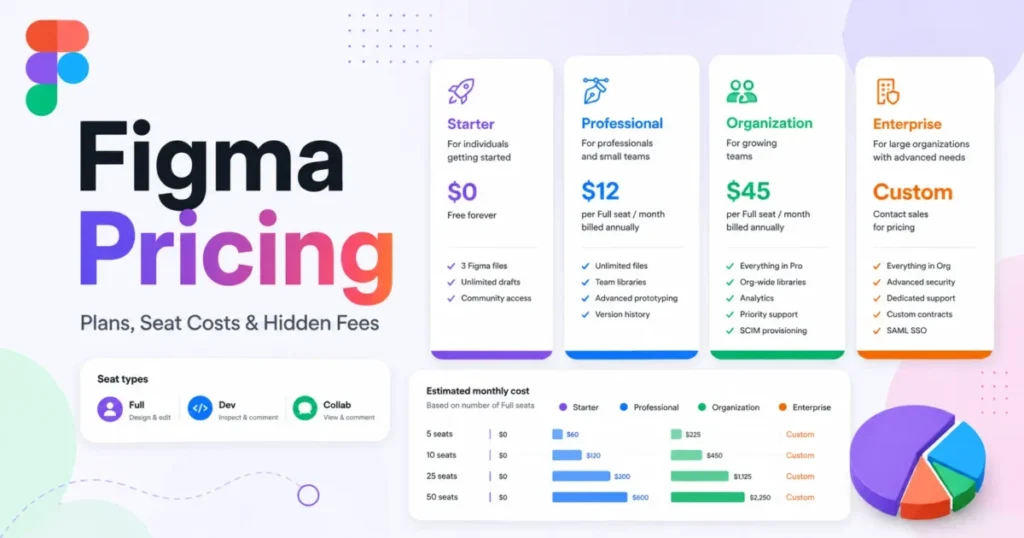
Figma is the more interesting anchor and the least comparable. A Collab seat costs $3 per month on the Professional plan and carries full access to FigJam, so a team already paying for Figma may already own a whiteboard.
That is a real decision for design-led organisations, and a bad one for everyone else. Figma pricing only reads as cheap if the rest of the suite is already in your budget.
On the same Figma plan, the Collab seat sits alongside Full seats at $16 per month and Dev seats at $12 per month.
Is Miro Worth the Price?
Bottom line: Miro is worth $8 per member/month for any team that needs private, permanent canvases and occasional external input, and worth $20 for teams whose external collaborators must be authenticated or whose AI workflows are real rather than occasional. It is not worth either price for a team that runs two or three canvases a quarter and never shares them outside the workspace.
Worth it if you are running recurring visual work with confidential content, collaborating with clients who need edit access, or building AI agents against board data with enough volume to need 2,000 daily MCP calls.
Not worth it if your whiteboarding is occasional, your team already pays for Figma and would use FigJam, or your facilitators work primarily from mobile where export, voting, and presentation mode are unavailable. For a fuller picture of what the product does well and badly outside the pricing question, the full Miro review covers the workflow side.
How to Avoid Overpaying for Miro
- Commit annually unless the team has a real end date. It is a flat 20%, worth $24 per Starter seat and $60 per Business seat every year.
- Buy seats to current headcount, not planned headcount. Additions are prorated immediately, removals only land at renewal, so over-buying is a one-way cost.
- Test whether public-link visitor editing is genuinely unacceptable. If it is not, Starter does the client-collaboration job for $12 less per seat per month.
- Measure AI credit burn for one full cycle before buying the add-on. Credits are pooled and do not roll over, so the fix is often redistributing usage rather than buying more.
- Check your procurement route before choosing the plan. Invoicing needs 10 Starter licences or 5 on Business, so a small team that must pay by invoice may have no Starter path.
- Set a calendar reminder for day 12 of any Business trial. It converts automatically at the end of 14 days unless you cancel.
- If you are on legacy Business, start the migration conversation now. The plan is scheduled to sunset within about a year and its Flow runs never reset.
How This Pricing Was Checked
This guide is based on Miro’s official pricing page, its product pages, Help Center documentation for each plan, the AI credit and MCP limit articles, the add-on and billing documentation, and the public developer reference. Prices and plan limits were checked on 28 August 2026.
Every plan was assessed against the same buyer-focused criteria: real cost at a given seat count, the feature gate that forces an upgrade, external-collaboration permissions, AI and automation ceilings, billing and procurement mechanics, and migration constraints.
Greater weight was given to the factors that change a purchase decision, including the practical entry tier, upgrade triggers, undisclosed add-on costs, and the difference between advertised and committed spend. Vendor positioning and affiliate relationships did not affect the analysis.
Figures that could not be verified against an official source were excluded rather than estimated, and add-on costs that Miro does not publish are named as unknown rather than modelled. Cost scenarios are this guide’s own arithmetic on published rates, labelled as calculations and never as vendor quotes.
Frequently Asked Questions
These are the questions the sections above do not fully close for a buyer comparing plans.
Is Miro free?
Yes. Miro’s Free plan costs $0 with unlimited members, and you can create unlimited boards, but only the three most recent ones stay editable and no board can be private.
How much is Miro per month?
Starter is $8 per member per month billed yearly or $10 billed monthly. Business is $20 per member per month billed yearly or $25 billed monthly, and Enterprise is quoted individually from 30 members.
What is the difference between Miro Starter and Business?
Starter gives private unlimited boards and lets external visitors edit through a public link. Business adds signed-in guest editing, single sign-on, unlimited workspaces, two-way integrations, Miro Prototypes and Engage, full AI Workflows, 50 AI credits per member per month, and 2,000 daily MCP calls.
Does Miro charge for guests?
No, guests do not consume a paid licence. Guest permissions are plan-gated instead: on Starter, signed-in guests can only view or comment, and guest editing requires Business or Enterprise.
How many boards can I have on the Miro Free plan?
Unlimited. The restriction is on editing, not creation, and only the three most recent boards remain editable.
Does Miro offer SSO?
Yes. SAML single sign-on is a Business feature covering identity providers including Entra ID, OneLogin, and Auth0, while SCIM provisioning, audit logs, and domain control require Enterprise.
What are Miro AI credits?
They are the consumption unit for Miro’s AI features, allocated at 25 per member per month on Starter and 50 on Business, pooled across the team, reset monthly, and never rolled over. Enterprise uses pooled bands starting at 2,500 credits per month for 1 to 50 seats.
Can I pay for Miro monthly?
Yes, by card, with no licence minimum on either cadence. Invoiced purchases are annual only and require at least 10 Starter licences or 5 Business licences.
Is the Miro Business trial free?
The Business trial runs 14 days at no charge, and it converts automatically to a paid Business subscription unless you cancel inside that window. A cancelling Starter customer returns to Starter with no additional charge.
Is Miro Enterprise worth it for a 30-person company?
Only if the driver is governance. Enterprise adds SCIM, audit logs, domain control, and regional data residency rather than more canvas, so a 30-person team with no identity-management requirement will usually get more value from Business.
About the author

Macedona is the founder and lead reviewer at SaaS CRM Review, where he has published 175+ in-depth reviews, pricing guides, and comparisons of CRM and SaaS tools. Each review is based on hands-on testing or verified documentation, and every article states clearly which method was used. Pricing and features are checked against official vendor sources, with the verification date noted in the article. Macedona follows a published review methodology and editorial policy. SaaS CRM Review earns affiliate commissions from some links, which never influence ratings or rankings. Read the full affiliate disclosure.